The blog has a chat widget. You can ask it questions — “what’s your take on n8n queue mode?”, “how did you handle the autoscaler?” — and it answers from what I’ve actually written. I built that twice. Same feature, different tools — everything else was different.
The first version used n8n and Supabase. The second rewrote it in Python using LangChain, LangGraph, and pgvector inside the existing Django app. Both work. Both answer questions about the blog. The difference isn’t the output — it’s everything underneath.
The n8n Version
The original took an afternoon. Open n8n, drop a Webhook node, connect an AI Agent node, point it at a Supabase vector store, add Gemini as the model. Done. No code written, just configuration — which node connects to which, which model to use, what the system prompt says.
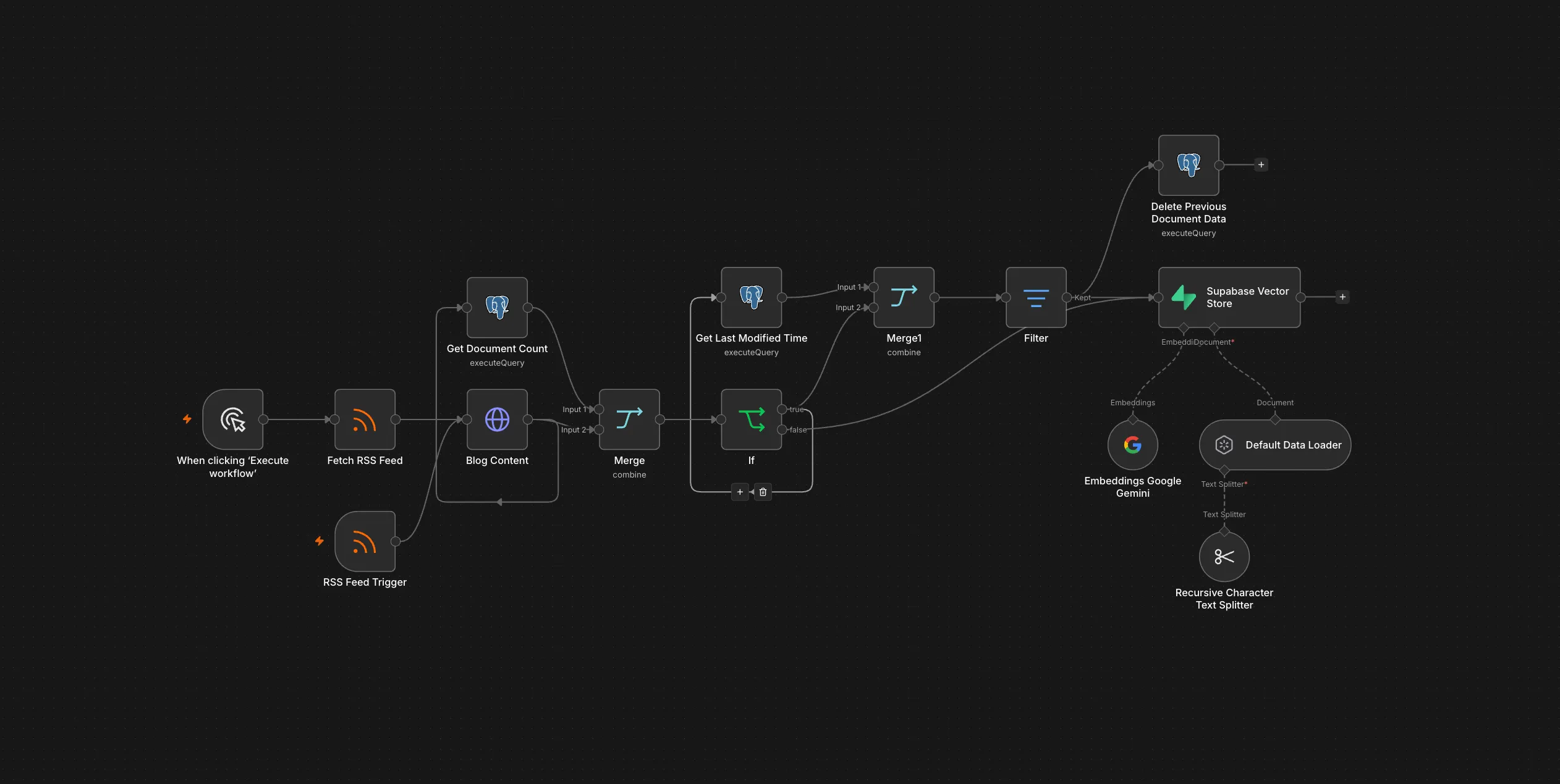
Supabase handled the vector store. n8n had a built-in integration. I didn’t have to write an embedding pipeline; I configured one. The ingestion side was another workflow: an RSS trigger that polled the feed, chunked the text, called the Gemini embedding model, and upserted into Supabase. Same pattern — nodes, configuration, done.
The visual execution log is genuinely good. When something breaks, you can see exactly which node failed, what input it received, what it output. Debugging a misconfigured node is faster than debugging a Python traceback.
The Python Version
The rewrite took longer. A lot longer. Writing the Django app from scratch meant: a DocumentChunk model with pgvector, an embedding pipeline with rate-limit handling, a LangGraph agent with a custom search tool, SSE log streaming for the sync endpoint, a GitHub Actions workflow to replace Vercel’s paid webhooks.
None of that was hard individually. All of it was work that n8n had already done for me.
n8n’s power is also its constraint. Every node does what it does — you can configure parameters, but you can’t change what the node is.
Want to stream sync logs back to the caller? That’s not a configuration — that’s code. In Python, the equivalent frustration is that you build everything. But you build it exactly the way you need it.
Here’s the LangGraph agent at the center of the Python version — the equivalent of n8n’s AI Agent node, except it’s code:
from langgraph.prebuilt import create_react_agent
from langgraph.checkpoint.memory import MemorySaver

agent = create_react_agent(
    model=ChatGoogleGenerativeAI(model="gemini-2.0-flash"),
    tools=[search_blog],
    checkpointer=MemorySaver(),
    prompt=SYSTEM_PROMPT,
)
Four lines that n8n handles with a drag-and-drop node. The difference is that every part of this is now programmable — swap the model, change the checkpointer to PostgresSaver for multi-worker deployments, add more tools, adjust the prompt from version control.
The Direct Mapping
Every n8n node in the original workflow has a Python equivalent. This is what the rewrite actually replaced:
| n8n Node | Python equivalent |
|---|---|
| Webhook | DRF APIView — ChatView.post() |
| AI Agent (LangChain) | create_react_agent from LangGraph |
| Buffer Window Memory | MemorySaver checkpointer (full thread, not a sliding window) |
| Supabase Vector Store tool | pgvector DocumentChunk model + search_blog tool |
| Gemini Embeddings | GoogleGenerativeAIEmbeddings in sync_from_rss |
| HTTP Request (fetch post body) | requests.get(api_url) in the sync command |
| Respond to Webhook | Response({"answer": ..., "sources": ...}) |
| RSS trigger (ingestion workflow) | sync_from_rss management command |
Node for node, it’s the same pipeline. The difference is that in n8n, each row in that table is a UI element you configure. In Python, it’s code you own. The n8n version got the pipeline working in an afternoon. The Python version took a week — and now the whole thing lives inside the app, version-controlled and debuggable the same way as everything else.
What Actually Changed
The biggest difference isn’t the code — it’s where the system lives.
The n8n version was isolated. The Django app knew nothing about it. The widget hit a webhook URL; n8n answered. Supabase held the vectors. Three separate systems, three separate places to debug when something broke.
The Python version collapsed that. DocumentChunk is a Django model in the same database as everything else. The sync endpoint authenticates with the same Bearer token pattern as other internal endpoints. The management command (sync_from_rss) runs the same way as migrate.
When the RAG is inside the app, it’s just part of the app. You get Django’s ORM, Django’s logging, Django’s deployment pipeline. When it’s in n8n, you get n8n’s.
Vector Store and Embeddings
For the vector store, the options split into self-hosted and managed. pgvector runs inside your existing postgres instance — no extra service, no extra cost, same database as everything else. Supabase is a managed option that handles indexing and infrastructure but adds an external dependency. For basic similarity search on a small corpus, pgvector is the simplest choice. At scale, a managed service earns its keep.
Embeddings are a separate decision. The free route is a self-hosted embedding model via Ollama (e.g. nomic-embed-text) — no API cost, but you need storage and compute to run it locally. The paid route is an API: Google Gemini embeddings and OpenAI embeddings are both options at different price points and quality levels. I used Gemini because the model quality was enough and the cost fit the scale of a personal blog.
Keeping Content in Sync
The core problem with any RAG system is keeping the vector database in sync with the actual content — new posts added, existing ones updated. Both versions needed to solve this.
The n8n version used an RSS trigger: the ingestion workflow polled the feed on a schedule and synced any new posts. Simple, but it had no awareness of when a Vercel deploy actually completed — just a periodic poll.
The Python version built a more direct orchestration: detect when a deploy finishes, trigger a re-sync immediately. Vercel webhooks were the natural trigger point but they’re a paid feature. The free alternative: Vercel writes deployment_status events to GitHub automatically on every deploy. A GitHub Actions workflow listens for those events and calls /rag/sync/ after every production success — the same outcome, no extra cost. The sync endpoint runs in a background thread and streams its output as SSE so the full log shows up inside the GitHub Actions run. The full implementation is in the blog_rag package devlog.
Testing the Agent
n8n has a built-in evaluation feature — you define test cases with expected outputs and run them against the agent to score correctness with metrics like string similarity and tool-usage verification. It’s purpose-built for evaluating agent behavior without touching code. Plan availability isn’t clearly documented, so check n8n’s current pricing before relying on it.
In Python, the agent is code — testable with standard tools: unit tests for retrieval logic, integration tests for the full pipeline. You write the test infrastructure yourself, but it runs in the same CI pipeline as everything else.
Managing Prompts
Tuning the prompt looks different in each approach, but neither is strictly better.
In n8n, prompts can be stored in data tables — separate from the workflow itself, updatable without touching the workflow JSON, reviewable by anyone with access to the n8n instance. In Python, the prompt is a string in prompts.py, git-tracked and part of the normal code review process.
The caveat on the n8n side: built-in Git integration is only available on the Business and Enterprise plans. On the community plan, you can manually export workflow JSON and commit it, but you’re building that bridge yourself — reading diffs inside a JSON blob, no branching, no change previews.
The prompt lives where the rest of your system lives. On self-hosted n8n community, that means wiring up the git bridge yourself.
When to Use Which
| n8n | Python / LangChain | |
|---|---|---|
| Setup time | Hours | Days |
| Code required | None | Significant |
| Debugging | Visual execution log | Python tracing |
| Prompt storage | n8n data tables | Code + git |
| Agent evaluation | Built-in (plan-dependent) | Custom test suite |
| Integration | Standalone system | Lives inside your app |
| Customization | Within node limits | Unlimited |
| Post-deploy sync | RSS polling | Event-driven via GitHub Actions |
| Git integration | Business/Enterprise only (community = manual export) | Native |
| Non-dev maintainable | Yes | No |
| Best for | RAG is the product | RAG is a feature |
Reach for n8n when: You need a prototype running today. The RAG is a standalone product. Non-developers will maintain it.
Reach for Python when: RAG is one piece of an app you already own. You need the customization. You want it in version control.
What I’d Do Differently
Build the n8n version first anyway. It was the right way to validate that the feature was worth having. If nobody had used the chat widget after a week, throwing away a few n8n nodes is easier than throwing away a Django package. The rewrite made sense once the first version proved the idea.
The lesson isn’t “n8n bad, Python good.” It’s that the right tool depends on where the feature lives. If it lives inside your app, write it inside your app. If it lives outside — or if you just need it working today — n8n is a better choice than building a whole service to orchestrate a few API calls.
Which side of this tradeoff are you on right now — configuring or coding?