I wanted a way for people visiting the blog to ask questions and actually get useful answers — not generic AI responses, but answers grounded in what I’ve actually written. The kind of thing where someone asks “what’s your take on n8n queue mode?” and gets a real answer pulled from the article where I wrote about it.
That meant building a RAG pipeline. And since I already use n8n for automation, wiring it together there made sense.
The Workflow
The setup is two entry points feeding into one AI Agent node.
A Webhook handles requests from the frontend chat widget. It receives a POST with message and sessionId, an Edit Fields node extracts those cleanly, then hands them to the agent. A Respond to Webhook node sends back { reply: output } once the agent finishes.
There’s also a Chat Trigger node for testing directly inside n8n — lets me talk to the agent without touching the frontend.
The AI Agent itself runs on Google Gemini (via the LangChain node), has a buffer window memory for conversation history, and is equipped with one tool: the Supabase Vector Store.
The RAG Tool
The vector store is configured in retrieve-as-tool mode, pointed at a blog_documents table in Supabase. The agent decides when to query it based on what the user asks — it’s not always-on retrieval, it’s tool-use, which means the agent can reason about whether it even needs to look something up.
Embeddings are generated with Gemini Embedding 2 (models/gemini-embedding-2), same model on both the ingestion side and retrieval side. topK is set to 20 — wide enough to pull relevant chunks even from longer articles.
The system prompt keeps it scoped:
You are a helpful assistant, you can access supabase vector for answering questions about the blog
Simple, but it’s enough. The agent knows its job.
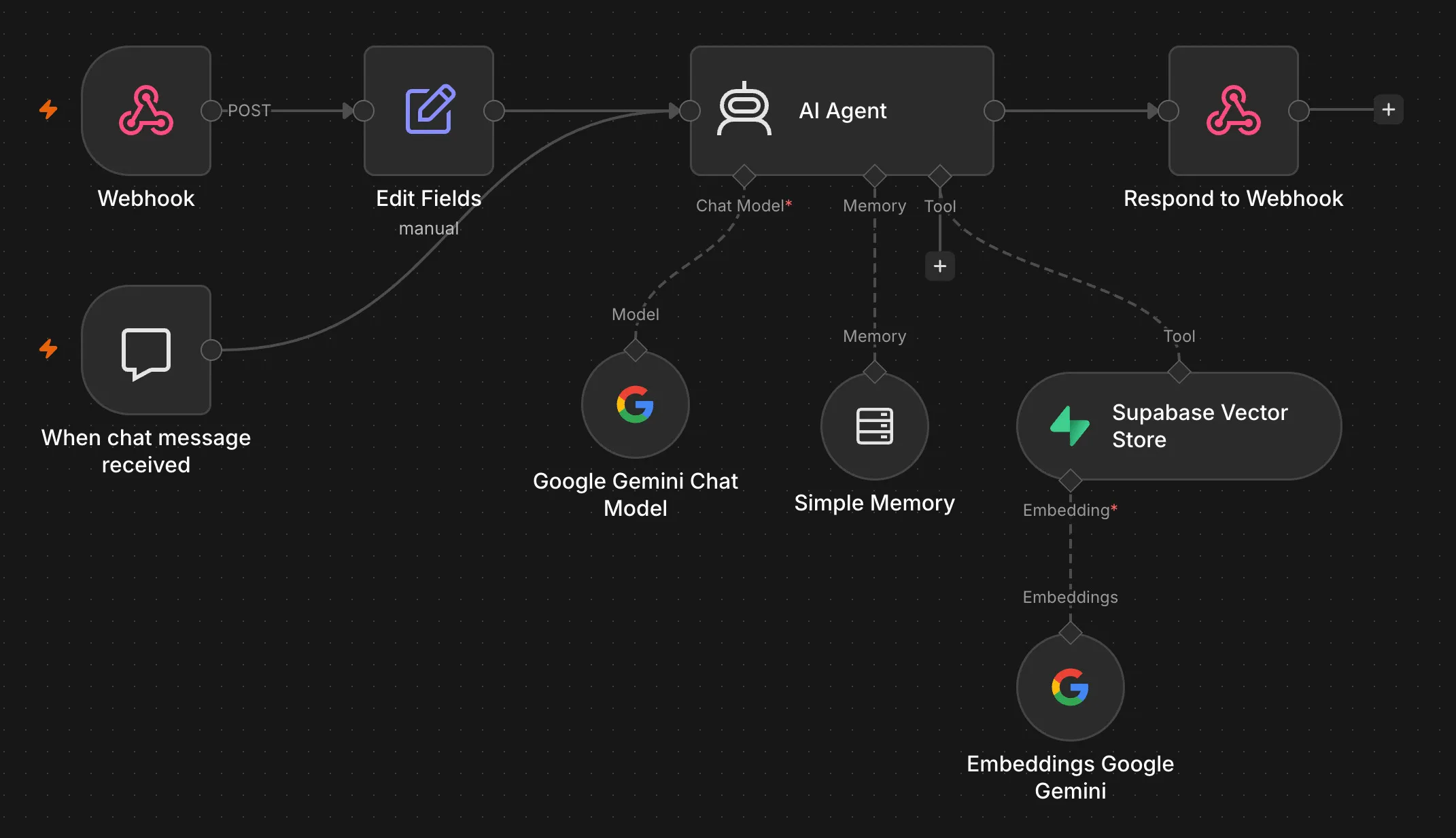
The n8n workflow handling incoming chat messages from the frontend — webhook entry, AI agent, and respond node.
The Frontend
Built a ChatWidget component in React — a floating button in the bottom-right corner, opens a chat panel called “Ask Atharva”. It generates a session ID on mount so the buffer memory on the n8n side can track conversation context per visitor. Messages go out as POST requests to the webhook URL (pulled from an env var), responses come back and get rendered in the panel.
The UX is intentionally minimal. No markdown rendering, no streaming, just clean message bubbles. The loading state shows a three-dot bounce animation while waiting for the agent to respond.
What Works
Asking questions about specific articles works well. “How did you handle autoscaling?” pulls the right chunks from the Redis/n8n piece and gives a coherent answer. “What projects have you worked on?” synthesizes across multiple posts. The memory means follow-up questions work naturally — you don’t have to re-explain context every message.
The topK: 20 setting is generous, which helps with broader questions that span multiple posts. It hasn’t caused any obvious hallucination issues so far — the chunks are specific enough that the model stays grounded.
What’s Next
The ingestion pipeline (chunking articles and embedding them into blog_documents) is a separate workflow that I run manually right now. I want to automate it so new posts get indexed on publish. Also considering adding a typing indicator that streams partial responses rather than waiting for the full reply — latency is fine but it feels slow without feedback.